
Skip to content
Help Center

Help Center

Start Free Forever
  • Help Docs
  • Sign In
  • App Status
  • Software
Help Center
Help Center

How Can We Help?

Getting Started

  • Step 1: Setup Your Platform Account
  • Step 2: Design A Platform You Want For Your Business

My Account Settings

  • Best Practice: Your Platforma Account
  • Platforma Support Hub
  • Add Your Profile Pic
  • Manage Billing
  • Updating Your Password
  • Password Reset
  • Notifications

Core Features

  • Online Course Feature
  • Coaching Support Hub Feature
  • Shopify Storefront Feature
  • Newsfeed Groups Feature
  • Video Content Feature
  • Auto Training Quiz Feature
  • Calculator Feature

Core Feature Settings

  • Selecting A Feature Icon
  • Feature Name
  • Feature Status
  • Feature Pricing
  • Creating A Hidden Feature
  • Intro Videos
  • Watch Pause Setting – Course Feature
  • Auto Lock Drip Setting – Course Feature

Integrations

  • Shopify Integration
  • Stripe Integration
  • AWeber Integration
  • ActiveCampaign Integration
  • Drip Integration
  • Mailchimp Integration
  • Getresponse Integration
  • Constant Contact Integration
  • Hubspot Integration
  • SendGrid Integration
  • Sendinblue Integration
  • MailerLite Integration
  • Zapier Integration

Member Management

  • Member Profile Data
  • Importing Members
  • Member Tags
  • Advanced Member Search
  • Bulk Member Actions
  • Updating A Member Email
  • Updating A Member’s Password
  • Delete A Member
  • Add An Internal Note To A Member’s Profile

Member's Area Settings

  • View Your Member’s App
  • Connecting A Domain
  • Adding A Feature
  • Send A Member Wide Broadcast
  • Tracking: Google Tag Manager Script
  • Tracking: Facebook Pixel
  • Change Feature Menu
  • Member Dashboard Announcement

QA's, Advice, & Troubleshooting

  • Can’t Login to my Platforma Account.
  • How can I add 2fa or two-factor access for my account?
  • Home
  • Docs
  • Integrations
  • AWeber Integration

AWeber Integration

IMPORTANT: You will need to have an existing AWeber account to complete this integration. 
You can check secure an AWeber account for your email automations here:
https://www.aweber.com

  1. 1
    Login to your Platform Account here: Your Platform Creator Dashboard Account.
  2. 2
    Navigate to "App Settings" then click "Marketing" tab/button
  3. 3
    Select AWeber Email Integration from the list of options
  4. 4
    Enter your AWeber Login Credentials into the form that is presented, this will connect the Platform/AWeber integration.
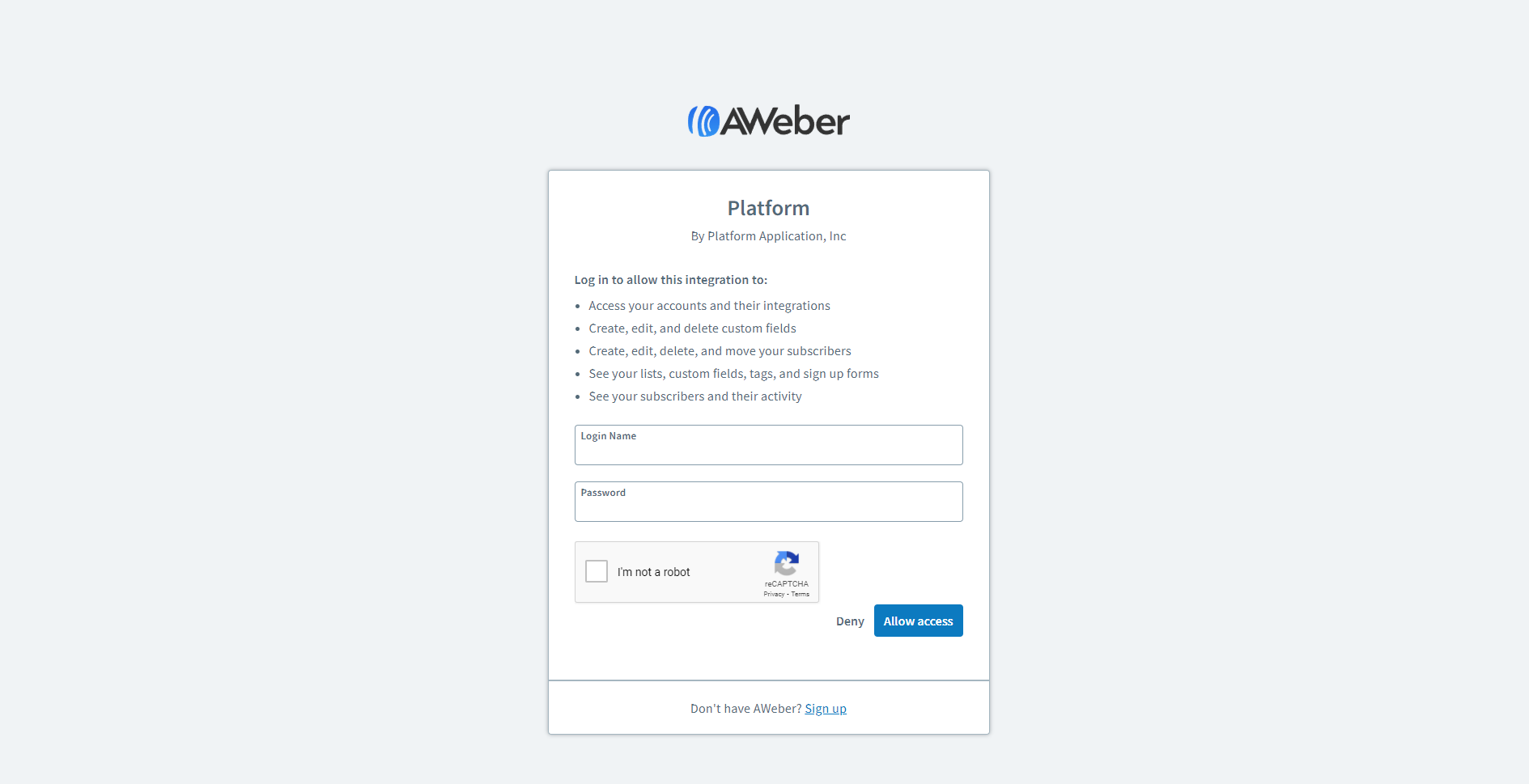
  1. 5
    Next, Select the AWeber List that you want your contacts/members who signup or are imported to your Platform to be sent to in AWeber. This can be done, by clicking the dropdown input field under the integration list. The dropdown will expose all of your AWeber lists in your AWeber account. Once your desired list is selected. Click "Save" button.
  2. 6
    Test Your Integration add a member to your Platform account from the members tab, and verify that the contact info has been imported into your AWeber account, and is associated with the correct list.
  3. 7
    Congrats!! Give yourself a pat on the back! You have just successfully connected your Platform to AWeber, and can start making backend sales by remarketing to your members.
Was This Article Helpful?
Share This Article :
  • Facebook
  • Twitter
  • LinkedIn
  • Pinterest
Still stuck? How can we help?

How can we help?

Updated on May 5, 2022

Powered by BetterDocs

Try Platforma For Free:

Start Free Forever

Start Building Your First Platform Right Now!

No obligations, no contracts, cancel at any time.

  • Deliver The Most Advanced Digital Product Ever
  • Turn Leads, Viewers, & Followers Into REPEAT Buyers
  • Sell Your Posts Instead Of Publishing For Free
  • Design A Branded "Homebase" For Your Content
  • All Your Customers Organized Into One Main Platform

PlatformArea.com - Platform Application, Inc. - All Rights Reserved @ 2020 - 2026

  • Help Docs
  • Sign In
  • App Status
  • Software