
Skip to content
Help Center

Help Center

Start Free Forever
  • Help Docs
  • Sign In
  • App Status
  • Software
Help Center
Help Center

How Can We Help?

Getting Started

  • Step 1: Setup Your Platform Account
  • Step 2: Design A Platform You Want For Your Business

My Account Settings

  • Best Practice: Your Platforma Account
  • Platforma Support Hub
  • Add Your Profile Pic
  • Manage Billing
  • Updating Your Password
  • Password Reset
  • Notifications

Core Features

  • Online Course Feature
  • Coaching Support Hub Feature
  • Shopify Storefront Feature
  • Newsfeed Groups Feature
  • Video Content Feature
  • Auto Training Quiz Feature
  • Calculator Feature

Core Feature Settings

  • Selecting A Feature Icon
  • Feature Name
  • Feature Status
  • Feature Pricing
  • Creating A Hidden Feature
  • Intro Videos
  • Watch Pause Setting – Course Feature
  • Auto Lock Drip Setting – Course Feature

Integrations

  • Shopify Integration
  • Stripe Integration
  • AWeber Integration
  • ActiveCampaign Integration
  • Drip Integration
  • Mailchimp Integration
  • Getresponse Integration
  • Constant Contact Integration
  • Hubspot Integration
  • SendGrid Integration
  • Sendinblue Integration
  • MailerLite Integration
  • Zapier Integration

Member Management

  • Member Profile Data
  • Importing Members
  • Member Tags
  • Advanced Member Search
  • Bulk Member Actions
  • Updating A Member Email
  • Updating A Member’s Password
  • Delete A Member
  • Add An Internal Note To A Member’s Profile

Member's Area Settings

  • View Your Member’s App
  • Connecting A Domain
  • Adding A Feature
  • Send A Member Wide Broadcast
  • Tracking: Google Tag Manager Script
  • Tracking: Facebook Pixel
  • Change Feature Menu
  • Member Dashboard Announcement

QA's, Advice, & Troubleshooting

  • Can’t Login to my Platforma Account.
  • How can I add 2fa or two-factor access for my account?
  • Home
  • Docs
  • Integrations
  • Shopify Integration

Shopify Integration

IMPORTANT: You will need to have an existing Shopify account to complete this integration. 

You can open a Shopify account for yourself at this link:
https://www.shopify.com

  1. 1
    Navigate to the Add A Feature tab inside of your Inside Your Platform Creator Dashboard Account.
  2. 2
    Select the Shopify Store Feature and add it to your member's area. You will see the feature added to the left hand side of your dashboard.
  3. 3
    Open Your Shopify Account Dashboard and click on the "Apps" tab in the left navigation. If this is your first time create a custom app, click "Allow custom app development" button. After page reloads, click the button again. Then click "Create an app" button.
  4. 4
    Give your app a name you can name this app whatever you want. You may want to add the word "Platform" in the app name so that you can easily recognize and remember that it is attached to your Platform account. Then click the button "Create app"
  5. 5
    Click the button "Configure Storefront API Scopes"  and select all the API scope options. Then save the configs.
  6. 6
    Install App by clicking the "Install app" button. You will be asked again, if you wan to do this. Click "Install"
  7. 7
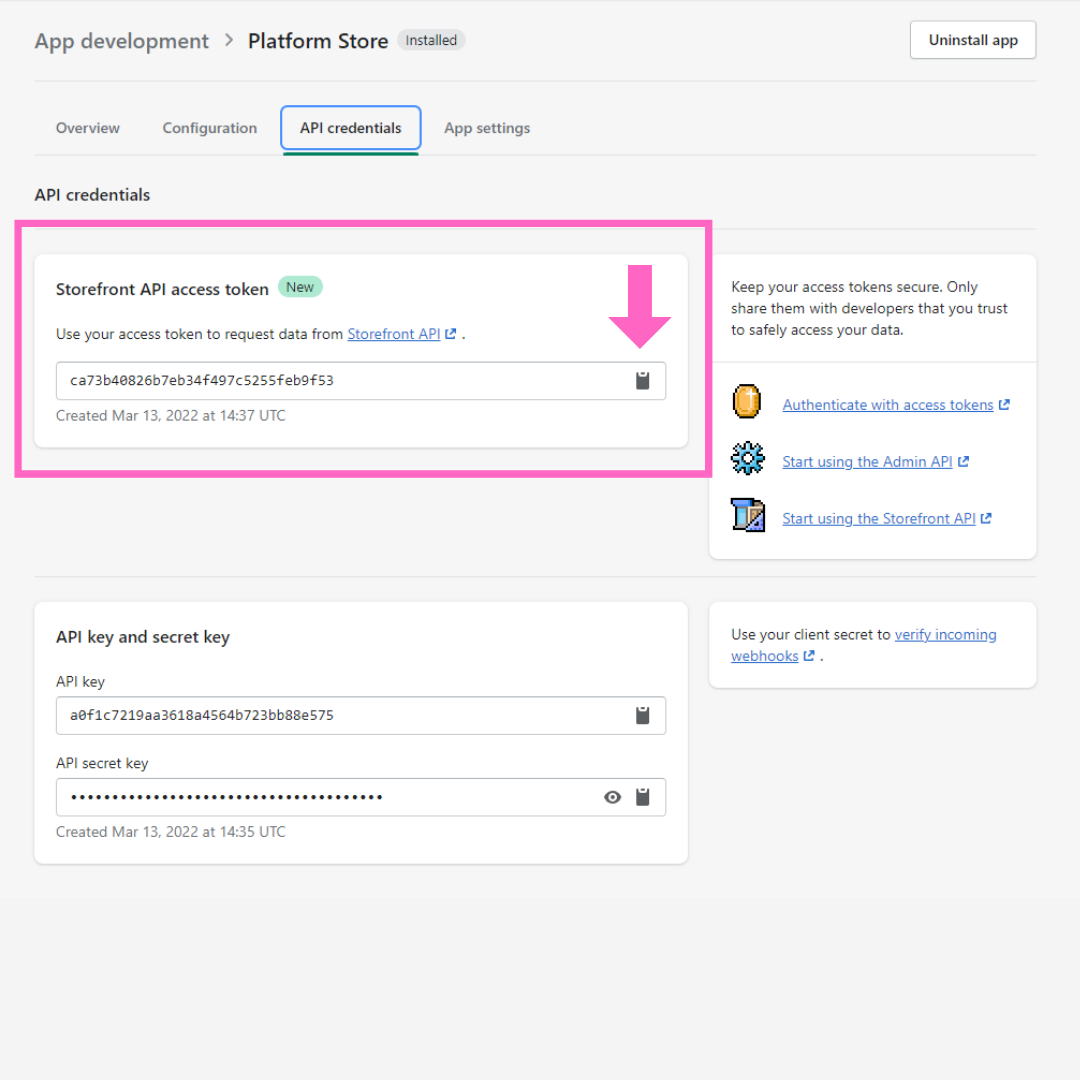
    Under API credentials copy your API key by clicking the copy button icon next to the API string
  1. 8
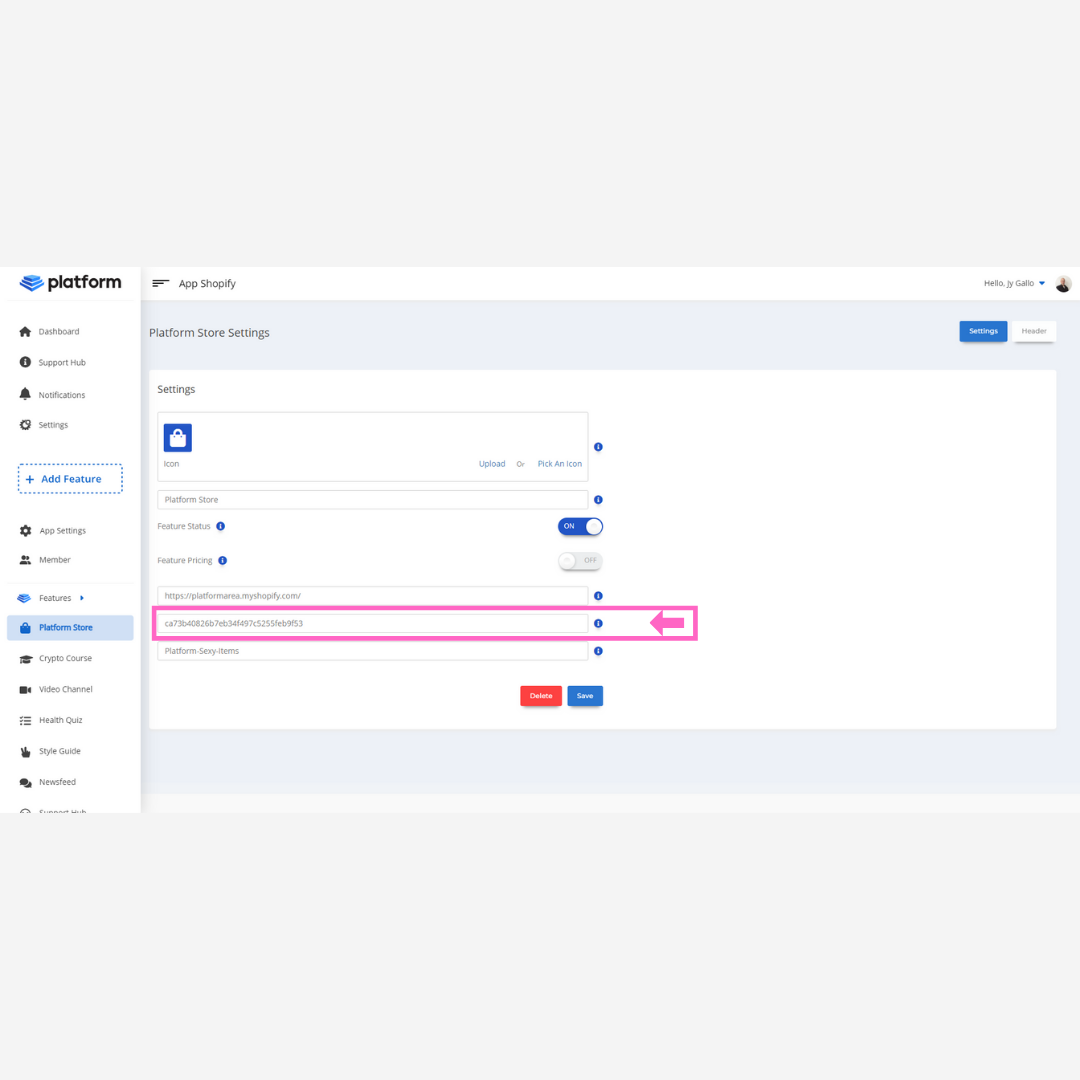
    Paste API key into your Platform Account in the Shopify store settings
  1. 9
    Navigate back to Shopify and copy the collection name of the collection you wish to import products of to your Platform Shopify store. Paste the collection name into the "Collection Name" field in your Platform Shopify Store settings. MAKE SURE TO REPLACE AN SPACES WITH A "-" (DASH)
  2. 10
    Copy and Paste Your Shopify Store URL into the settings field in your Platform account. This is the main URL to your shopify store. IT DOES NOT HAVE TO BE THE MYSHOPIFY URL. Only if you don't have a custom domain attached to your Shopify account. 
  3. 11
    Then Click the "Save" button in your Platform account settings for the Shopify Store feature.
  4. 12
    Congrats!! You have now successfully integrated your Shopify Store with Platform.
Was This Article Helpful?
Share This Article :
  • Facebook
  • Twitter
  • LinkedIn
  • Pinterest
Still stuck? How can we help?

How can we help?

Updated on May 5, 2022

Powered by BetterDocs

Try Platforma For Free:

Start Free Forever

Start Building Your First Platform Right Now!

No obligations, no contracts, cancel at any time.

  • Deliver The Most Advanced Digital Product Ever
  • Turn Leads, Viewers, & Followers Into REPEAT Buyers
  • Sell Your Posts Instead Of Publishing For Free
  • Design A Branded "Homebase" For Your Content
  • All Your Customers Organized Into One Main Platform

PlatformArea.com - Platform Application, Inc. - All Rights Reserved @ 2020 - 2026

  • Help Docs
  • Sign In
  • App Status
  • Software